Help Center › iPhone & iPad › Read PDFs
Search text in a PDF
Find words and phrases in any PDF, with accent-insensitive search support.
Applies to iOS / iPadOS 16 or later
Use the search feature to find any word or phrase in a PDF document, even in scanned files processed with OCR.
Open search
- Open the PDF and tap the magnifying glass in the bottom bar.
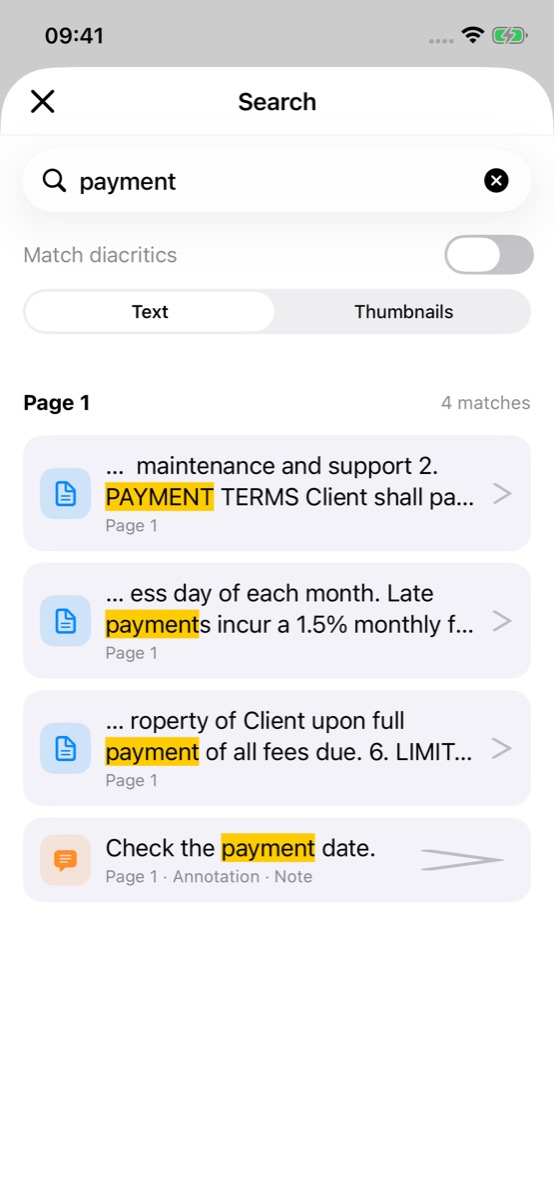
- Type the word or phrase in the search field. Results appear as you type, grouped by page — matches inside your comments and notes are listed too.
- Turn on Match diacritics only when accents must match exactly (off: *resume* also finds *résumé*).
- Text lists the matching lines; Thumbnails shows the pages that contain a match.
- Tap a result to jump to it on the page.
 2345
The Search sheet with results
Search for a word
Accent-insensitive search
Kiwi PDF can find text regardless of accents and diacritics. For example, searching for resume also finds résumé.
To control this, use the Match diacritics switch. When it is off (default), accents are ignored. Turn it on to require an exact accent match.
Tips
- Search is case-insensitive by default — "PDF" and "pdf" return the same results.
- If the PDF was created from scanned pages, search works only after OCR has been applied (see OCR a scanned PDF).
- Very large PDFs may take a moment to index on first search.