Help Center › Windows › Getting started
Editor interface tour
A quick look at the toolbar, tool dock, undo and the main controls.
Applies to Windows 10 or later
Get familiar with the main parts of the Kiwi PDF editor before you start annotating.
iPhone & iPad
Android
Mac
Windows
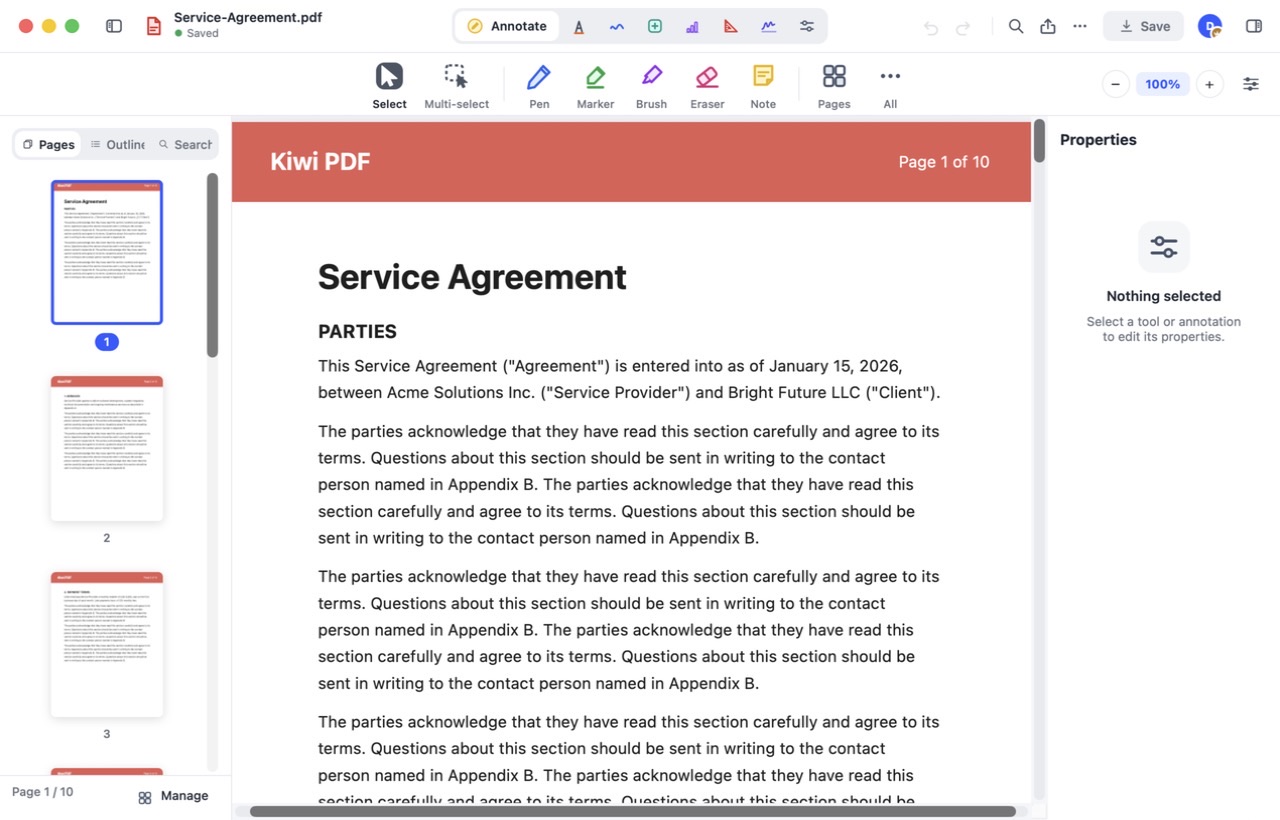
- Tool group bar — Annotate, Markup, Draw, Insert, Chart, Measure, Fill & Sign and Edit.
- Tool row — the tools of the current group, plus Pages and All.
- Save — undo/redo, search, share and ••• sit next to it.
- Page sidebar — Pages, Outline and Search; Manage at the bottom opens the page manager.
- Properties panel — appears on the right for the selected tool or annotation.
 12345
The parts of the editor
Web
Undo and autosave
Kiwi PDF saves your changes automatically — you never need to press Save. To reverse a change tap (or click) Undo; to bring it back tap Redo. Undo history is kept for the entire editing session.