
Annotate and highlight PDFs online
Highlight, comment, draw and mark up PDFs for study, review and feedback — and everyone can see your notes in their own PDF app.
Free to start · No sign-up · Works in Chrome, Edge, Safari & Firefox
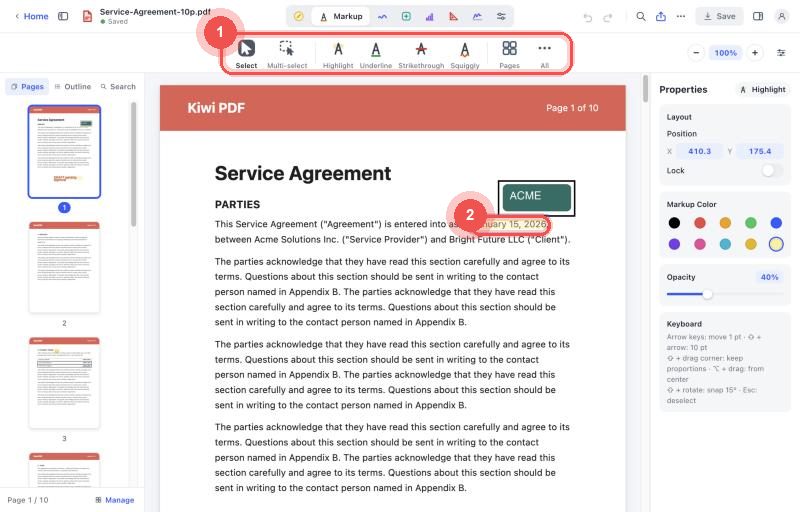
Kiwi PDF has a complete set of markup tools: highlight, underline, strikethrough and squiggly lines on text; sticky notes and comments; freehand pen and highlighter; lines, arrows, rectangles, ellipses, polygons and clouds; text boxes, stamps and images. Annotations are saved as standard PDF annotations, so colleagues using Adobe Acrobat, Preview or a mobile app see and can reply to them.
How it works
- Step 1
Open a PDF
Open the document you want to review.
- Step 2
Pick a tool
Choose Markup, Draw or Insert, then select text or drag on the page.
- Step 3
Save and share
Save — your notes are embedded as standard PDF annotations.
Step-by-step guide in the Help Center
Why Kiwi PDF
Text markup
Highlight, underline, strikethrough and squiggly.
Comments & notes
Sticky notes with author name, readable in other apps.
Drawing & shapes
Pen, highlighter, arrows, boxes, clouds and polygons.
Compatible
Annotations open and stay editable in Acrobat and Preview.
Frequently asked questions
Is annotating PDFs free?
Yes, annotation tools are free.
Will others see my highlights?
Yes. Annotations are saved in the PDF itself using the standard format.
Can I remove annotations later?
Yes — select and delete any annotation, or remove them all with one tool.
Related PDF tools


Annotate and highlight PDFs online
Also on iPhone, iPad, Android and Mac