
Sign a PDF online for free
Add a handwritten-looking signature to contracts, forms and agreements in under a minute — no printing, no scanning.
Free to start · No sign-up · Works in Chrome, Edge, Safari & Firefox
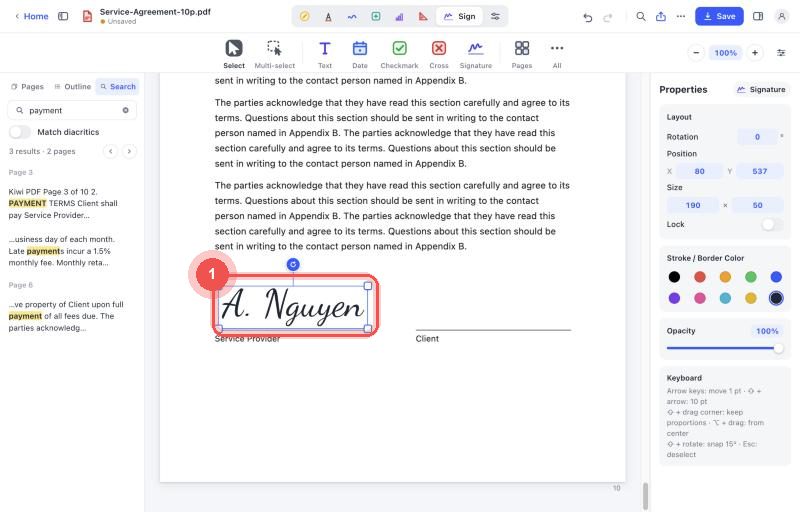
Draw your signature with a mouse, trackpad or pen, type your name in a handwriting font, or import a photo of your signature. Place it anywhere on the page, resize and rotate it, and Kiwi PDF remembers it in your signature library so the next document takes one click. Add dates, initials, check marks and text to finish the form, then save a normal PDF you can email straight away.
How it works
- Step 1
Open the document
Open the PDF you need to sign in the Kiwi PDF editor.
- Step 2
Create your signature
Choose Fill & Sign › Signature, then draw, type or import it.
- Step 3
Place and save
Click where it belongs, adjust the size and click Save.
Step-by-step guide in the Help Center
Why Kiwi PDF
Draw, type or image
Three ways to create a signature that looks like yours.
Signature library
Saved signatures are ready for every future document.
Complete the form
Add dates, initials, ticks and text next to your signature.
Standard PDF output
The signed file opens correctly in Acrobat, Preview and mobile apps.
Frequently asked questions
Is signing a PDF free?
Yes, you can create and place signatures for free.
Is this a legally valid electronic signature?
It is a simple electronic signature, which many everyday agreements accept. For documents that require a certified digital signature, check the requirements of the receiving party.
Can I sign on my phone?
Yes — the Kiwi PDF app for iPhone, iPad and Android lets you sign with your finger.
Related PDF tools


Sign a PDF online for free
Also on iPhone, iPad, Android and Mac