
Fill out PDF forms online
Complete application forms, contracts and registration sheets on screen instead of printing them.
Free to start · No sign-up · Works in Chrome, Edge, Safari & Firefox
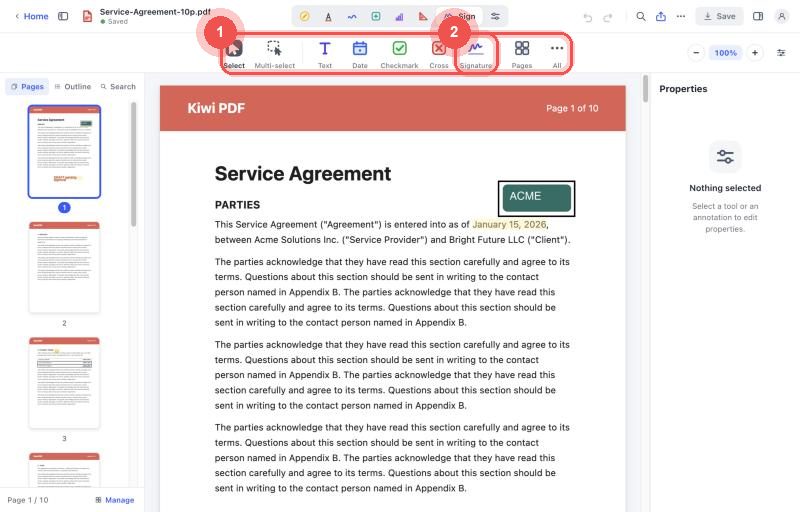
Interactive PDF forms open with every text field, checkbox, radio button, list and signature box ready to fill. Flat forms — scans or PDFs without fields — work too: click anywhere to type, add a date, a tick or a cross, and sign. Need to send a form yourself? Kiwi PDF can also create fillable fields (text, checkbox, radio, dropdown, list, signature) that others fill in Acrobat or any PDF reader.
How it works
- Step 1
Open the form
Open the PDF form in the Kiwi PDF editor.
- Step 2
Fill it in
Click fields to type, tick boxes, or add text anywhere on a flat form.
- Step 3
Sign and save
Add your signature if needed and save the completed PDF.
Step-by-step guide in the Help Center
Why Kiwi PDF
Fillable forms
Text fields, checkboxes, radio buttons, dropdowns and lists.
Flat forms
Type anywhere, add dates, ticks and crosses.
Create forms
Add your own fillable fields to any PDF.
Flatten when done
Lock the answers so they can no longer be changed.
Frequently asked questions
Is filling PDF forms free?
Filling and creating form fields is part of Kiwi PDF Premium. Adding text, dates, ticks and signatures on top of any PDF is free.
Will my answers show in Adobe Acrobat?
Yes. Values are written into the form fields with proper appearances, so every viewer shows them.
Can I fill a scanned form?
Yes — use text, date and check-mark tools to fill flat forms.
Related PDF tools


Fill out PDF forms online
Also on iPhone, iPad, Android and Mac