
Compress a PDF online for free
Make a PDF small enough to email or upload — without turning crisp text into a blurry picture.
Free to start · No sign-up · Works in Chrome, Edge, Safari & Firefox
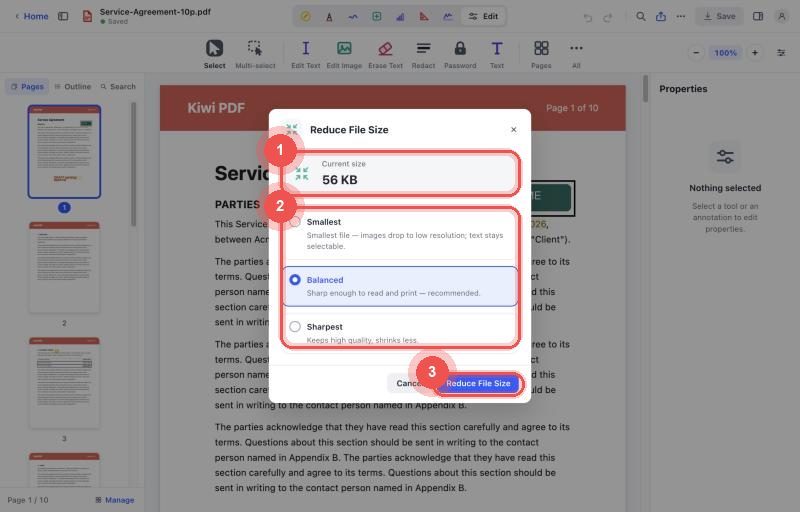
Large PDFs are almost always large because of photos and scanned images. Kiwi PDF compresses only those images, at the level you choose, and leaves text, fonts and vector drawings untouched — so the document stays searchable, selectable and sharp at any zoom.
How it works
- Step 1
Choose Compress
Open the Tools Hub and pick Compress PDF.
- Step 2
Pick a level
Choose stronger compression for email, lighter for printing.
- Step 3
Save
Save the smaller PDF.
Step-by-step guide in the Help Center
Why Kiwi PDF
Text stays sharp
Only images are downsampled; text and vectors are kept as they are.
Several levels
Balance file size against image quality.
Searchable result
Compressed PDFs keep selectable, searchable text.
Keeps structure
Links, bookmarks and forms survive compression.
Frequently asked questions
Is compressing PDFs free?
Yes, you can compress PDFs for free.
How much smaller will my PDF get?
It depends on how many images it contains. Scans and photo-heavy files shrink the most; text-only PDFs are already small.
Will the text become blurry?
No. Kiwi PDF never rasterises text when compressing.
Related PDF tools


Compress a PDF online for free
Also on iPhone, iPad, Android and Mac