
Free online PDF viewer & reader
Open any PDF in your browser in a second — no install, no upload form. Read comfortably, search the text and jump between pages.
Free to start · No sign-up · Works in Chrome, Edge, Safari & Firefox
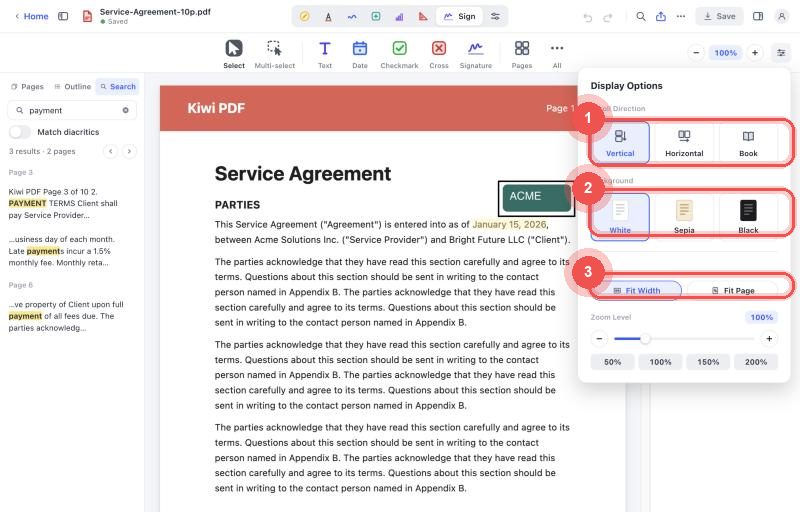
Kiwi PDF is a full PDF reader that runs in a browser tab. Scroll vertically or horizontally, fit pages to width or to the screen, switch to a softer background for long reading sessions, and search the whole document — including accent-insensitive search. Outlines, page thumbnails and links work just like in a desktop viewer. When you need to do more, the same window lets you highlight, comment, sign or edit the file.
How it works
- Step 1
Open a PDF
Click "Open editor" and drop a PDF, or choose one from your computer.
- Step 2
Read your way
Use View to pick scroll direction, page fit and background tone.
- Step 3
Search & navigate
Search text, use thumbnails and the outline to jump to any page.
Step-by-step guide in the Help Center
Why Kiwi PDF
Fast in the browser
Large PDFs render page by page, so you start reading immediately.
Comfortable reading
Vertical or horizontal scrolling, fit to width or page, sepia and dark backgrounds.
Full-text search
Find words across the document, with an option to ignore accents.
Password-protected PDFs
Open encrypted PDFs by entering their password.
Frequently asked questions
Is this PDF viewer free?
Yes, opening and reading PDFs is completely free.
Can I open a PDF without installing anything?
Yes. Kiwi PDF runs in Chrome, Edge, Safari and Firefox on your computer. On phones, use the free iPhone, iPad or Android app.
Can I annotate while reading?
Yes — highlight text, add notes or draw directly on the page, then save.
Related PDF tools


Free online PDF viewer & reader
Also on iPhone, iPad, Android and Mac