
Password protect a PDF
Lock invoices, contracts and personal documents so only the right person can open them.
Free to start · No sign-up · Works in Chrome, Edge, Safari & Firefox
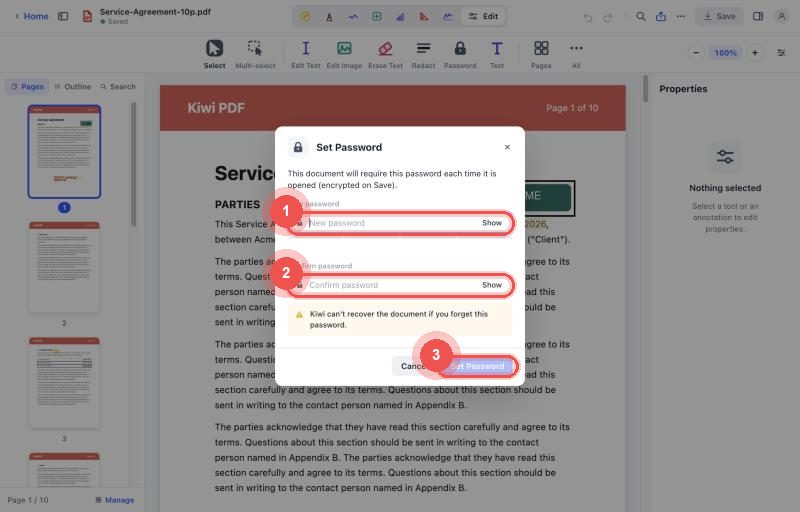
Set an open password and Kiwi PDF encrypts the whole document with strong AES encryption — the same standard Adobe Acrobat uses — so the file cannot be read without the password in any PDF app. You can later change the password or remove it, and you can open and edit password-protected PDFs you receive.
How it works
- Step 1
Open the PDF
Open the document you want to lock.
- Step 2
Set a password
Choose Password, type a strong password and confirm it.
- Step 3
Save
Save — the PDF now asks for the password every time it opens.
Step-by-step guide in the Help Center
Why Kiwi PDF
Strong encryption
AES encryption compatible with Acrobat and every major viewer.
Change or remove
Update or remove the password whenever you need.
Open locked PDFs
Read and edit encrypted files after entering the password.
Keeps everything
Forms, annotations and bookmarks stay intact.
Frequently asked questions
What if I forget the password?
Encrypted PDFs cannot be opened without it — keep the password somewhere safe.
Will the recipient need special software?
No. Any PDF reader asks for the password and opens the file.
Is password protection free?
Password protection is part of Kiwi PDF Premium; opening password-protected PDFs is free.


